


xTool
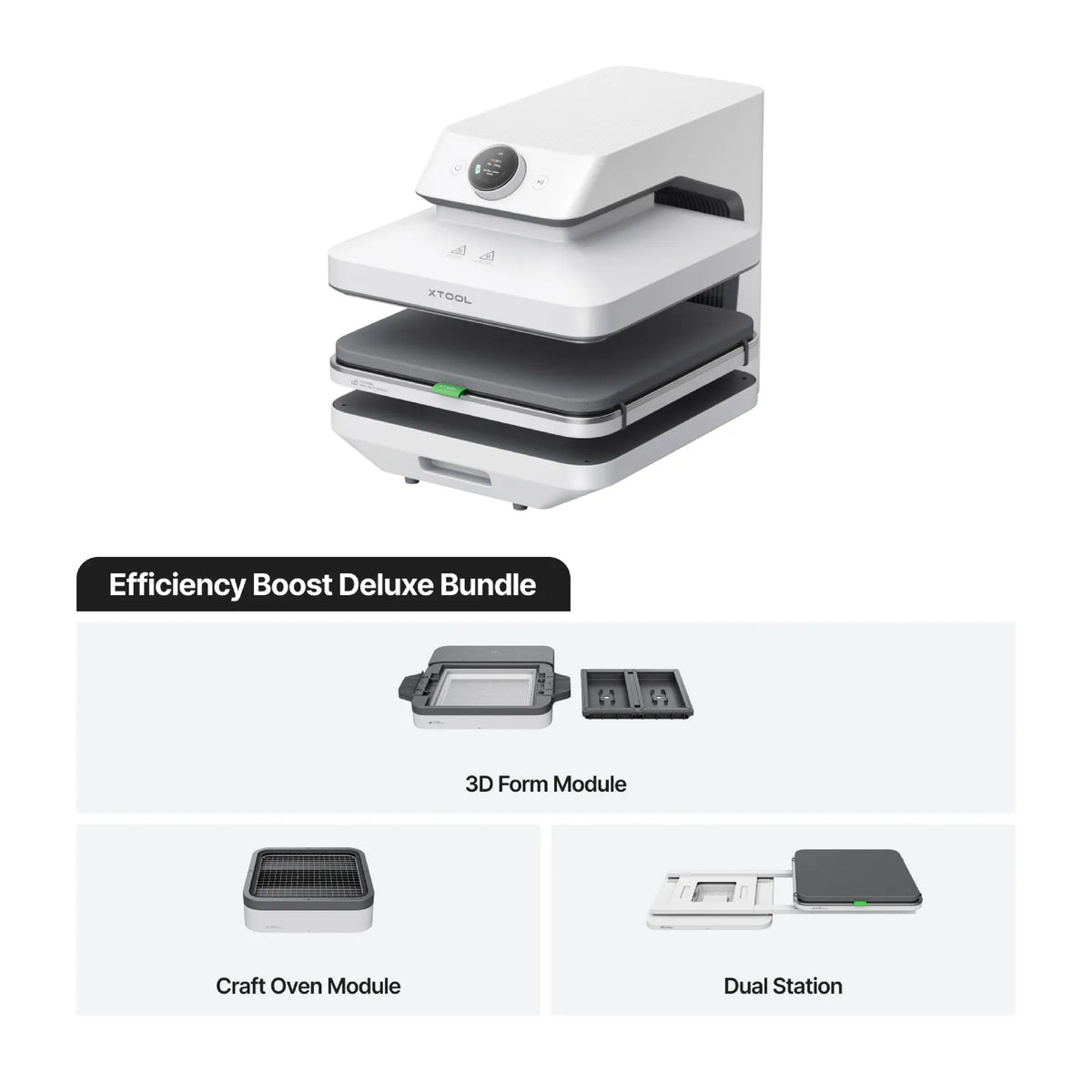
xTool WonderPress 3D Auto Heat Press (Heat Press + Craft Oven Module + 3D Form Module)
xTool WonderPress 3D Auto Heat Press (Heat Press + Craft Oven Module + 3D Form Module) - Standalone
SKU:
This xTool product qualifies for FREE STANDARD SHIPPING when purchased individually. Any special delivery requirements, such as after-hours delivery or tailgate services, will be invoiced separately. To receive free shipping, xTool items must be the only products in your cart at checkout. Additional items must be purchased separately.
The xTool WonderPress 3D Auto Heat Press is a modular heat press designed to expand what creators and small businesses can produce from a single system. Combining automatic heat pressing with optional interchangeable modules, WonderPress supports traditional 2D heat-transfer applications while opening the door to a wider range of 3D creative projects.
For everyday apparel decoration, WonderPress provides a streamlined solution for HTV, sublimation and DTF transfers, making it easy to produce customized T-shirts, garments and other flat products. Its automatic operation helps simplify the pressing process and deliver consistent results while reducing hands-on work.
What sets WonderPress apart is its modular design. Depending on the configuration, the system can be expanded with a 3D Form Module and Craft Oven Module, allowing users to move beyond flat transfers into applications such as 3D sublimation, formed projects and other customized products. The Craft Oven can also support DTF curing as part of a 2-in-1 cure-and-press workflow.
Whether you're producing apparel, personalized products or experimenting with new applications, the xTool WonderPress provides a versatile platform designed to help businesses expand their capabilities without adding multiple standalone machines.
Couldn't load pickup availability


xTool WonderPress 3D Auto Heat Press
The First 3D Auto Heat Press with Switchable Creativity

Why xTool WonderPress Outperforms the Rest


| xTool WonderPress | Other Auto Heat Presses | |
| Versatility | Auto Heat Press, 3D Sublimation, Vacuum Forming, DTF Curing, Craft Baking | Heat Press Only |
| Heating Evenness | 2X Heating Density: No More Cold Spots | Cold Spots Reported |
| Max Pressure | 100 kg (220 lbs): DTF One-Press Perfection | 60–80 kg (130–170 lbs) |
| Setting Adjustment | Every 1 kg / 1° Increments: Ultra-Precise Control | 7 Adjustable Levels |
| Max Heating Height | 2X Height: 3" (75 mm) | 1.18–1.77" (30–45 mm) |
| Smart Presets | 35 Built-In Presets + One-Click Preset Library via App | Only 4 Preset Modes (A, B, C, D) |
Additional Information
What makes WonderPress's heat press performance better than the rest?
Unlike traditional presses that rely on guesswork, WonderPress combines industrial power with surgical precision through four core breakthroughs:
- 2X Heat Density: Double the heating tubes for ultra-even distribution. No cold spots—just perfect, edge-to-edge transfers.
- True 100kg Pressure: Intense, consistent force drives adhesive deep into fibers, preventing peeling or fading.
- Intuitive Rotary Control: A high-precision knob and 1.8" vivid screen replace clunky buttons for smoother settings.
- Infinite Expandability: More than just a press. Swap in the 3D Form or Craft Oven modules anytime to unlock new possibilities.
-
Is there software for the machine?
Yes! WonderPress operates beautifully via the physical machine interface, but it also integrates with thexTool Studio App for an enhanced experience. You can view and adjust temperature, pressure, time, and modes directly on the machine's 1.8-inch smart screen, or use the App for even more intuitive and efficient parameter settings.
Additionally, for the 3D Form Module, we provide a dedicated design platform—the Photo Case & Badge Generator—to help you perfectly align graphics for phone cases and badges before printing.
-
Do I need an external exhaust pipe or air purifier to cure DTF films?
No. The Craft Oven Module features a built-in, industry-leading 3-layer purification system (H11 filter + Carbon + H13 HEPA) that blocks up to 99.95% of DTF fumes, smoke, and odors. It is completely safe for indoor home studio use.
-
Is the 3-layer filter replaceable in the Craft Oven Module?
Yes, it is. To maintain optimal air purification, the H13 HEPA and activated carbon filter can be easily replaced. Replacement filters will be available for purchase on xTool.com later on.
-
Can I vacuum form any objects I want?
Not everything is suitable for molding, as some shapes can get "stuck" in the plastic. For the best experience:
1. Look for "Slopey" Shapes: Choose objects that are wider at the bottom and narrower at the top (like a pudding cup). This is called a Draft Angle, and it helps the mold pop right out.
2. Avoid "Hooks": Avoid objects with jutting parts or holes on the sides (called Undercuts). These will trap the plastic and make it impossible to pull your object out.
3. Use Flexible Sheets: For tricky shapes, our flexible TPU sheets make de-molding much easier!
Additionally, the bottom of the forming area is close to the heating plate, so objects can heat up quickly during the process. If you put your object into the machine at the same time as the sheet, the object should be heat-resistant up to 100°C. For items that cannot withstand this heat, we recommend heating the plastic sheet to temperature first, and then placing your object inside just before the vacuum activates.
-
What exactly can be done with the 3D Sublimation Mode of 3D Form Module?
- By leveraging advanced vacuum-suction technology, the 3D Form Module heats and stretches sublimation film to tightly wrap around curved surfaces. This ensures that pre-printed designs perfectly conform to 3D objects with seamless coverage.
- You can sublimate almost any object that fits within the module’s workspace, provided it has a sublimation coating or is made of compatible polymers. Popular applications include phone cases, badges, keycaps, and other curved or textured items that traditional flat presses simply cannot handle.
- Please note: 3D sublimation requires corresponding molds/fixtures to properly support and secure the object's shape during the process.
-
Do I need to use xTool-selected materials?
WonderPress is designed to be an open-source platform. While we offer high-quality xTool materials optimized for the best results with our pre-tested settings, you can use any standard sublimation paper, sublimation film, HTV, or vacuum-forming plastic sheets (e.g., TPU, PETG, HIPS).
However, only xTool sheets are pre-cut to the exact dimensions needed to fit our module smoothly.
- Vacuum Forming Sheets: 310 × 255 mm
- 3D Sublimation Film: 148 × 254 mm
-
Why are there 35 built-in presets? Is it genuinely efficient, or will it cause confusion during operation?
It is engineered for professional efficiency. While the system hosts 35 presets in total, the interface is modular and contextual. The machine automatically filters and displays only the relevant presets for the specific module you have installed.
- Heat Press Module: 10 custom presets
- 3D Form Module—Vacuum Forming: 10 custom presets
- 3D Form Module—Vacuum Sublimation: 5 custom presets
- Craft Oven Module—Baking: 5 custom presets
- Craft Oven—Curing: 5 custom presets
When you switch modules, the system switches with you—keeping your workspace clean, focused, and foolproof.
-
Do I need to buy multiple different printers to use the WonderPress? What if I don't own one?
You can create professional projects without owning any printers. Here is how:
1. No Printer Needed (Using Raw Materials)
- Flat Heat Transfers: Beyond DTF and sublimation, WonderPress works perfectly with Pre-cut Heat Transfer Vinyl (HTV), Infusible Ink, Pre-made Patches, and Rhinestone transfers—none of which require a printer.
- Vacuum Forming: Requires zero printers. It molds 3D shapes directly from formable sheets (like PETG or ABS).
- 3D Heat Transfers: While this process requires sublimation ink printed on paper/sublimation film, you still do not need to own the printer yourself (see below).
2. The "Ready-to-Press" Solution (Outsourcing) For full-color DTF or 3D Sublimation, you can easily outsource the printing to third-party custom websites. Simply search for "Ready-to-Press DTF Films" or "Custom Sublimation Transfers", and upload your designs. You then can have your printed designs shipped straight to your door.
Our Recommendation:
- Hobbyists & Beginners: Start without a printer to save upfront costs while exploring 100% of WonderPress's capabilities.
- Small Business owners: Invest in dedicated DTF or Sublimation printers when you scale up to maximize your efficiency and profits.
| Heat Press Module (Main Unit) | |
| Heat Platen Size | 15" × 15" (380 × 380 mm) Large Platen |
| Temperature Range | 80–210°C (176–410°F) |
| Pressure Range | 44–220 lbs (20–100 kg) Precision Control |
| Time Range | 1–999 seconds |
| Input Voltage & Rated Power | AC 100–120 V, 1150–1650 W, 50/60 Hz |
| Dimensions & Weight | 16.5" × 21.6" × 16.5" (418 × 549 × 410 mm) | 48.5 lbs (22 kg) |
| 3D Form Module | |
| Suction Power | Max. -90 kPa (Industrial-Grade Vacuum) |
| Vacuum Forming Area | Up to 8" × 10" (203 × 254 mm) Film Sheets |
| Max. Forming Height | Up to 3.5" (90 mm) |
| Max. Sublimation Area | Up to 4.8" × 9" (122 × 229 mm) Objects |
| Dimensions & Weight | 20.5" × 16.1" × 4.2" (522 × 410 × 108 mm) | 15.9 lbs (7.2 kg) |
| Craft Oven Module | |
| DTF Curing Area | Up to 17" × 17" (432 × 432 mm) DTF Films |
| Chamber Dimensions (W × D × H) | 15.6" × 6.2" × 3.1" (398 × 158 × 80 mm) |
| Air Filtration | Built-In 3-Layer Filter (H11 + Carbon + H13 HEPA) |
| Dimensions & Weight | 18.3" × 18.3" × 5.5" (465 × 465 × 140.7 mm) | 9.7 lbs (4.4 kg) |
| Smart Control & Safety | |
| Display & Controls | 1.8" (45.7 mm) Vivid Screen + Intuitive Rotary Knob |
| Software Support | xTool Studio App (Cloud Presets Library) |
| Built-In Custom Presets | 35 Smart Built-In Custom Presets for Instant Offline Creation |
| Safety Features | Auto-Standby, Slide-Out Design (Away from Heat Source) |
| Construction & Storage | |
| Body Material | PC/PBT |
| Colour | White |
| Storage Temperature | -4°F–140°F (-20°C–60°C) |
Depot Service Only: The xTool WonderPress is supported through our depot service program. Should your heat press require warranty or non-warranty service, it must be returned to RB Digital's service facility for inspection and repair. On-site service is not available for this product.